How to move attachments from Xero to QuickBooks Online
Attachment Mover copies the files attached to your Xero bills, sales invoices and spend money transactions onto the matching bills, invoices and expenses in QuickBooks Online, after the migration has moved the transactions themselves. It costs $79 per company, paid once, for up to 2,000 attachments ($149 above that), and the count and match preview are free.
Why the attachments are missing
Migration tools move transactions, not the files on them. Intuit's own page on transferring Xero data to QuickBooks Online lists attachments among the data types that cannot be transferred, and the QuickBooks community has threads such as "migration from Xero using Dataswitcher but no bills attachments".
So the bill for the office rent is in QuickBooks, but the PDF of it is still in Xero. For an audit, a tax question or a supplier dispute, you want the receipt on the record.
The manual way
If you only have a few dozen, you can do it by hand:
- In Xero, open the bill and download each file under Files.
- In QuickBooks Online, find the same bill (by number or by date and amount), open it and drop the file on Attachments.
- Repeat for every bill, invoice and expense. At about a minute each, 500 attachments is a full working day.
With Attachment Mover
Three steps, and you see the result before you pay:
- Connect Xero. It reads which bills, invoices and spend money transactions have files, without downloading them, and counts them.
- Connect QuickBooks Online. It reads your bills, invoices and expenses over the same dates and matches each Xero document to one QuickBooks record. The preview says how many attachments matched, and lists the ones that did not and why.
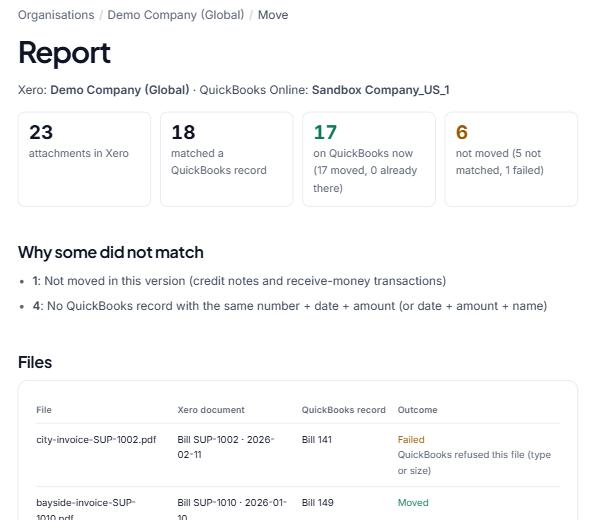
- Pay once and type the confirmation. Each file is downloaded from Xero and attached to its QuickBooks record. The report lists what moved, what was already there, what did not match and anything that failed.
What is matched, and what is not
A Xero document is matched only when exactly one QuickBooks record of the same kind has the same number, date and total, or the same date, total and supplier or customer name. The date and total alone are never enough, and no file is guessed onto a record.
Files that do not match come back to you in a ZIP, filed by document, with a CSV that says why each one was not moved, so you can attach them by hand. Credit notes and receive-money files are not moved in this version.
Related tools
Only want a copy of every Xero attachment, for the archive? The attachment export for Xero downloads them all as ZIP files, named and filed by document. Already in QuickBooks Online and need the receipts out for an audit? Attachment Bundler downloads QuickBooks attachments by date, type and supplier.
Questions
Does Dataswitcher move attachments from Xero?
No. Intuit's own page on transferring Xero data to QuickBooks Online lists attachments among the data types that cannot be transferred. Your bills and invoices arrive in QuickBooks; the receipts and PDFs attached to them stay in Xero.
Which attachments does Attachment Mover move?
Files attached to Xero bills go onto the matching QuickBooks Online bills, files on sales invoices onto the matching invoices, and files on spend money transactions onto the matching expenses. Credit notes and receive-money files are not moved in this version; they are listed with the files that were not moved.
How does it find the right QuickBooks record?
By the document number, the date and the total, to the cent. When the number is missing (expenses often have none), by the date, the total and the supplier or payee name. If two records fit, or none does, the file is not moved and you get it in a ZIP with a list saying why.
What does it cost?
The count and the match preview are free. Moving the files is a one-time payment per Xero organisation: $79 for up to 2,000 attachments, $149 for more. VAT or sales tax is added at checkout where it applies.
What happens if I run it twice?
Nothing is uploaded twice. Each moved file is remembered, and before every upload the QuickBooks record is checked for a file with the same name and size.
Does it change anything else in Xero or QuickBooks?
No. In Xero it only reads, and Xero shows read-only access when you connect. In QuickBooks it adds attachments to records that already exist; it never edits, creates or deletes a transaction.
How long does it take?
Xero allows about 60 calls a minute per organisation, and each file is one download, so 1,000 attachments take roughly 20 to 30 minutes. The move runs on our server; you can close the page and come back.
Sources read on 26 November 2026. Attachment Mover is made by Atesen Software and is not affiliated with Xero, Intuit or Dataswitcher.