Migration risk scorecard: Xero or QuickBooks Desktop to QuickBooks Online
A free migration risk scorecard tool for moving from Xero or QuickBooks Desktop to QuickBooks Online. Answer a few questions, or load your chart of accounts, and it lists what Intuit's own migration will not bring across, each item linked to the Intuit page that says so. It runs in your browser: nothing you type or load is sent anywhere.
How the score works
Each item below is something Intuit's help pages say does not move, or moves differently, from Xero or QuickBooks Desktop to QuickBooks Online. The points next to it are our own estimate of how much work or risk it brings: up to 20 for the biggest problems (data you lose, a step that blocks the import, or a plan too small for your file), less for things you rebuild by hand, 3 to 5 for history that stays behind, and 0 for notes. The score is the sum for your answers, capped at 100: under 30 is low, 30 to 59 medium, 60 and above high. It is a heuristic, not an official Intuit or Xero rating.
Items marked "not verified" are questions Intuit's pages do not answer; they score 3 points or none. Where Intuit's US and Canadian pages disagree, both are quoted.
Everything that does not transfer, with Intuit's source
Xero to QuickBooks Online (Dataswitcher, from Intuit's US page)
-
Attachments on bills, invoices and expenses · Will not come across · 20 points
Intuit lists file attachments among the Xero data that will not be converted. Your bills and invoices arrive in QuickBooks Online; the receipts and PDFs on them stay in Xero.
Source: Intuit (US): Convert from Xero to QuickBooks Online (updated 4 Aug 2026) · Intuit (Australia): Transferring Xero data to QuickBooks Online (no date on the page)
-
Payroll and the employees list · Will not come across · 20 points
The employees list and payroll information (employee details, pay calendars, tax information and pension) are on Intuit's list of Xero data that will not be converted. Keep the Xero payroll reports you need.
Source: Intuit (US): Convert from Xero to QuickBooks Online (updated 4 Aug 2026)
-
Foreign-currency transactions become home currency · Comes across differently · 20 points
Intuit: "Transactions of different currencies in Xero will be converted into the home currency configured in QuickBooks Online." Foreign-currency balances and amounts are not kept as such.
Source: Intuit (US): Convert from Xero to QuickBooks Online (updated 4 Aug 2026)
-
More than two years of history costs extra · Comes across differently · 10 points
Dataswitcher converts up to 2 fiscal years at no charge; additional years of fiscal data are an extra-fee option. Intuit's Australian page adds that older transactions are consolidated into an opening balance unless you buy extra years.
Source: Intuit (US): Convert from Xero to QuickBooks Online (updated 4 Aug 2026) · Intuit (Australia): Transferring Xero data to QuickBooks Online (no date on the page)
-
Projects · Will not come across · 10 points
Project details (quotes and estimates, tasks and expenses, profitability) are on Intuit's not-converted list.
Source: Intuit (US): Convert from Xero to QuickBooks Online (updated 4 Aug 2026)
-
Fixed asset register · Will not come across · 10 points
Fixed assets management is on Intuit's not-converted list. Export the Xero fixed asset register and depreciation schedule before you leave.
Source: Intuit (US): Convert from Xero to QuickBooks Online (updated 4 Aug 2026)
-
Tracking categories: extra fee, one location per transaction · Comes across differently · 8 points
Tracking categories and options become Classes and Locations in QuickBooks Online, as an extra-fee option. QuickBooks Online allows only one department or location per transaction.
Source: Intuit (US): Convert from Xero to QuickBooks Online (updated 4 Aug 2026)
-
Inventory items: extra fee, Plus or Advanced · Comes across differently · 8 points
Inventory items are an extra-fee option in Dataswitcher, and Intuit says that for inventory you need QuickBooks Online Plus or Advanced.
Source: Intuit (US): Convert from Xero to QuickBooks Online (updated 4 Aug 2026)
-
Budgets · Will not come across · 8 points
Budgets are on Intuit's list of Xero data that will not be converted. Export them from Xero and enter them again.
Source: Intuit (US): Convert from Xero to QuickBooks Online (updated 4 Aug 2026) · Intuit (Australia): Transferring Xero data to QuickBooks Online (no date on the page)
-
Repeating invoices and bills · Will not come across · 8 points
Intuit lists memorized transactions as not converted. In Xero these are your repeating invoices and bills (our reading of Intuit's term), so set them up again as recurring transactions.
Source: Intuit (US): Convert from Xero to QuickBooks Online (updated 4 Aug 2026) · Intuit (Australia): Transferring Xero data to QuickBooks Online (no date on the page)
-
Bank reconciliation history, drafts and the terms list · Will not come across · 5 points
Bank reconciliation history is on Intuit's not-converted list, with deleted transactions, draft or unposted journals and the terms list.
Source: Intuit (US): Convert from Xero to QuickBooks Online (updated 4 Aug 2026)
-
Invoice templates · Will not come across · 4 points
Invoice templates and other templates are not converted. Rebuild your branding in QuickBooks Online.
Source: Intuit (US): Convert from Xero to QuickBooks Online (updated 4 Aug 2026) · Intuit (Australia): Transferring Xero data to QuickBooks Online (no date on the page)
-
Closed quotes and purchase orders · Will not come across · 4 points
Closed or partially closed estimates and purchase orders are not converted. Intuit's Australian page lists non-posting entries (quotes) as data that cannot be transferred.
Source: Intuit (US): Convert from Xero to QuickBooks Online (updated 4 Aug 2026) · Intuit (Australia): Transferring Xero data to QuickBooks Online (no date on the page)
-
The QuickBooks Online company has to be blank · Plan and set-up checks · 20 points
Intuit: "Be sure your company file in QuickBooks Online is blank." Start the conversion in a new, empty company.
Source: Intuit (US): Convert from Xero to QuickBooks Online (updated 4 Aug 2026)
-
Lock dates and closed years · Comes across differently · 3 points · not verified
Intuit's pages don't say how Xero lock dates carry over (not verified). Bank reconciliation history is not converted and only 2 fiscal years are free, so keep access to Xero for closed-year records.
Source: Intuit (US): Convert from Xero to QuickBooks Online (updated 4 Aug 2026)
-
Bank rules · Good to know · 0 points · not verified
Intuit's conversion pages don't say whether Xero bank rules convert (not verified). They are not on the list of data converted at no charge, so plan to set them up again.
Source: Intuit (US): Convert from Xero to QuickBooks Online (updated 4 Aug 2026)
QuickBooks Desktop to QuickBooks Online
-
Payroll: paycheck detail becomes year-to-date totals · Comes across differently · 20 points
This year's paychecks move as regular checks and their details as year-to-date totals; liability refunds and adjustments move as journal entries. Intuit says to run payroll, wait 2-3 business days, and finish the move at least 7 business days before the next payroll. Its Canadian page adds that detailed pay stub histories do not transfer.
Source: Intuit (US): Learn how features and data transfer from QuickBooks Desktop to QuickBooks Online (updated 5 Nov 2026) · Intuit (US): Move your QuickBooks Desktop company file to QuickBooks Online (updated 5 Nov 2026) · Intuit (Canada): Learn how features and data transfer from QuickBooks Desktop to QuickBooks Online (no date on the page)
-
The import replaces what is already in QuickBooks Online · Plan and set-up checks · 20 points
Intuit: "The move replaces any data already in your online account," and you can't undo it.
Source: Intuit (US): Learn about switching from QuickBooks Desktop to QuickBooks Online (updated 5 Nov 2026) · Intuit (US): Move your QuickBooks Desktop company file to QuickBooks Online (updated 5 Nov 2026)
-
Both import windows have passed · Plan and set-up checks · 20 points
You have 90 days from when you sign up for QuickBooks Online to import your data; if your accountant is doing it for you, they have 180 days. Your subscription is older than 180 days: check with Intuit before you plan around the import.
Source: Intuit (US): Learn about switching from QuickBooks Desktop to QuickBooks Online (updated 5 Nov 2026) · Intuit (US): Move your QuickBooks Desktop company file to QuickBooks Online (updated 5 Nov 2026)
-
Past 90 days: only an accountant's import window is left · Plan and set-up checks · 15 points
You have 90 days from when you sign up for QuickBooks Online to import your data; if your accountant is doing it for you, they have 180 days. Your subscription is between 90 and 180 days old, so only the accountant's window is still open.
Source: Intuit (US): Learn about switching from QuickBooks Desktop to QuickBooks Online (updated 5 Nov 2026) · Intuit (US): Move your QuickBooks Desktop company file to QuickBooks Online (updated 5 Nov 2026)
-
The 90-day import window is closing · Plan and set-up checks · 8 points
You have 90 days from when you sign up for QuickBooks Online to import your data (180 days if your accountant does it). Leave time to check the result and try again.
Source: Intuit (US): Learn about switching from QuickBooks Desktop to QuickBooks Online (updated 5 Nov 2026) · Intuit (US): Move your QuickBooks Desktop company file to QuickBooks Online (updated 5 Nov 2026)
-
Inventory is recalculated with FIFO · Comes across differently · 15 points
QuickBooks Online recalculates inventory with FIFO from your migration date and records any adjustments, and Intuit says some inventory reports may not match your Desktop reports. Assemblies become single items on sales, group items become bundles (not tracked as inventory), and units of measure and manufacturer part numbers are set up again.
Source: Intuit (US): Learn how features and data transfer from QuickBooks Desktop to QuickBooks Online (updated 5 Nov 2026) · Intuit (US): Learn about switching from QuickBooks Desktop to QuickBooks Online (updated 5 Nov 2026)
-
Attachments: some may stay behind · Comes across differently · 10 points
Intuit's US page says some attachment file types and locations don't move. Attachments are stored where your company file is located, and after the move you get a report of what transferred, so you can upload the rest by hand. Intuit's Canadian page says attachments linked to transactions are not transferred.
Source: Intuit (US): Learn about switching from QuickBooks Desktop to QuickBooks Online (updated 5 Nov 2026) · Intuit (US): Learn how features and data transfer from QuickBooks Desktop to QuickBooks Online (updated 5 Nov 2026) · Intuit (Canada): Learn how features and data transfer from QuickBooks Desktop to QuickBooks Online (no date on the page)
-
Custom fields and price levels · Will not come across · 10 points
The Other and Other Customer custom fields are set up again, as are customer type, sales rep, price level and credit limit. Price Levels and Billing Rate Levels have no built-in QuickBooks Online match. Custom fields per transaction depend on the plan: 1 on Simple Start, 4 on Essentials and Plus, 12 on Advanced.
Source: Intuit (US): Learn how features and data transfer from QuickBooks Desktop to QuickBooks Online (updated 5 Nov 2026) · Intuit (US): Learn about usage limits (updated 19 Nov 2026)
-
Sales tax payments may land in the wrong period · Comes across differently · 8 points
Intuit says migrated sales tax payments may apply to the wrong filing period: delete them and record them again in the Sales Tax Center. Save a copy of your Sales Tax Liability report before you move.
Source: Intuit (US): Learn how features and data transfer from QuickBooks Desktop to QuickBooks Online (updated 5 Nov 2026) · Intuit (US): Move your QuickBooks Desktop company file to QuickBooks Online (updated 5 Nov 2026)
-
Timesheets and mileage · Will not come across · 8 points
Timesheet data, pay item mappings and time settings don't move, and neither do past mileage trips.
Source: Intuit (US): Learn how features and data transfer from QuickBooks Desktop to QuickBooks Online (updated 5 Nov 2026)
-
The company file must be on a local drive · Plan and set-up checks · 8 points
Intuit: "Your company file needs to be on your local hard drive, not on a server or hosting service." Copy it to a local drive first.
Source: Intuit (US): Learn about switching from QuickBooks Desktop to QuickBooks Online (updated 5 Nov 2026)
-
Multicurrency: entries with three or more currencies · Comes across differently · 6 points
Intuit's US page says your multicurrency preferences and transactions move. Its Canadian page warns that transactions with 3 or more currencies on a single entry fail or cause errors during the migration.
Source: Intuit (US): Learn how features and data transfer from QuickBooks Desktop to QuickBooks Online (updated 5 Nov 2026) · Intuit (Canada): Learn how features and data transfer from QuickBooks Desktop to QuickBooks Online (no date on the page)
-
Estimates and purchase orders change state · Comes across differently · 6 points
Active estimates move as Closed and inactive ones as Rejected. Links between purchase orders and bills don't carry over, so open purchase orders won't show items as received until you link them to the bill.
Source: Intuit (US): Learn how features and data transfer from QuickBooks Desktop to QuickBooks Online (updated 5 Nov 2026)
-
Bank feeds and bank rules · Will not come across · 5 points
Bank and credit card connections don't move, bank rules (including auto-recognised ones) are set up again, and bank feed transactions you haven't categorised don't move. Categorise them before the move.
Source: Intuit (US): Learn how features and data transfer from QuickBooks Desktop to QuickBooks Online (updated 5 Nov 2026) · Intuit (US): Learn about switching from QuickBooks Desktop to QuickBooks Online (updated 5 Nov 2026)
-
Custom form templates and memorised reports · Will not come across · 5 points
Custom form templates are rebuilt as custom form styles, and memorised reports as custom reports.
Source: Intuit (US): Learn how features and data transfer from QuickBooks Desktop to QuickBooks Online (updated 5 Nov 2026)
-
Memorised transactions and statement charges · Comes across differently · 5 points
Memorised transactions map to recurring transactions in QuickBooks Online. Recurring payment transactions, pending sales and statement charges are set up again.
Source: Intuit (US): Learn how features and data transfer from QuickBooks Desktop to QuickBooks Online (updated 5 Nov 2026)
-
Past reconciliation reports · Will not come across · 4 points
Reconciliation status moves, but past reconciliation reports don't. Save or print the ones you want to keep before you move.
Source: Intuit (US): Learn how features and data transfer from QuickBooks Desktop to QuickBooks Online (updated 5 Nov 2026) · Intuit (Canada): Learn how features and data transfer from QuickBooks Desktop to QuickBooks Online (no date on the page)
-
Audit trail · Will not come across · 4 points
Intuit's US page lists the audit trail among the things to set up again; its Canadian page says historical audit trail data does not migrate. Keep the Desktop file for that history.
Source: Intuit (US): Learn how features and data transfer from QuickBooks Desktop to QuickBooks Online (updated 5 Nov 2026) · Intuit (Canada): Learn how features and data transfer from QuickBooks Desktop to QuickBooks Online (no date on the page)
-
Budgets: Profit & Loss only · Comes across differently · 4 points
Intuit's US page says budget data from the Profit & Loss Budget Performance report migrates; its Canadian page says only Profit and Loss budget types copy. A balance sheet budget is not in either.
Source: Intuit (US): Learn how features and data transfer from QuickBooks Desktop to QuickBooks Online (updated 5 Nov 2026) · Intuit (Canada): Learn how features and data transfer from QuickBooks Desktop to QuickBooks Online (no date on the page)
-
Users, roles and permissions · Will not come across · 3 points
Desktop users don't carry over: invite them again. Payment roles and permissions are set up again.
Source: Intuit (US): Learn how features and data transfer from QuickBooks Desktop to QuickBooks Online (updated 5 Nov 2026)
-
Closing date and closed years · Comes across differently · 3 points · not verified
Intuit's US pages don't say how the closing date and its password move (not verified; the Canadian table lists the closing date password among items that move). Past reconciliation reports don't move and the audit trail is set up again, so keep Desktop for closed-year history.
Source: Intuit (US): Learn how features and data transfer from QuickBooks Desktop to QuickBooks Online (updated 5 Nov 2026) · Intuit (Canada): Learn how features and data transfer from QuickBooks Desktop to QuickBooks Online (no date on the page)
-
File size: Intuit checks it but does not publish the limit · Good to know · 0 points · not verified
Intuit says files that are too large won't import, and points you to Total Targets (press F2 or Ctrl+1 in Desktop); if the file is over the limit, condense it first. The pages do not state the number (not verified), so this item scores nothing.
Source: Intuit (US): Learn about switching from QuickBooks Desktop to QuickBooks Online (updated 5 Nov 2026) · Intuit (US): Move your QuickBooks Desktop company file to QuickBooks Online (updated 5 Nov 2026)
-
Desktop 2023 and older: support has ended · Good to know · 0 points
Intuit: "After May 31, 2026, QuickBooks Desktop 2023 software will be discontinued." Live support and security updates stop, and so do services such as payroll, Desktop Payments and online bank feeds.
Source: Intuit (US): QuickBooks Desktop 2023 service discontinuation policy (updated 5 Aug 2026)
-
Multicurrency is not on Simple Start · Plan and set-up checks · 20 points
Intuit: "Multi-currency isn't available in QuickBooks Online Simple Start." Choose Essentials or a higher plan.
Source: Intuit (US): Learn how features and data transfer from QuickBooks Desktop to QuickBooks Online (updated 5 Nov 2026)
The QuickBooks Online plan you pick (both)
-
More than 250 accounts needs Advanced · Plan and set-up checks · 20 points
Simple Start, Essentials and Plus allow up to 250 accounts in the chart of accounts; Advanced has no limit. Intuit's Xero conversion page says the same: more than 250 accounts needs QuickBooks Online Advanced.
Source: Intuit (US): Learn about usage limits (updated 19 Nov 2026) · Intuit (US): Convert from Xero to QuickBooks Online (updated 4 Aug 2026)
-
Inventory tracking needs Plus or Advanced · Plan and set-up checks · 20 points
Inventory tracking is only included in QuickBooks Online Plus and Advanced.
Source: Intuit (US): Learn how features and data transfer from QuickBooks Desktop to QuickBooks Online (updated 5 Nov 2026) · Intuit (US): Convert from Xero to QuickBooks Online (updated 4 Aug 2026)
-
Classes and locations are not on this plan · Plan and set-up checks · 15 points
Classes and locations are not available on Simple Start or Essentials. Plus allows 40 combined classes and locations; Advanced has no limit.
Source: Intuit (US): Learn about usage limits (updated 19 Nov 2026)
-
More than 40 classes and locations needs Advanced · Plan and set-up checks · 15 points
Plus allows 40 combined classes and locations; Advanced has no limit.
Source: Intuit (US): Learn about usage limits (updated 19 Nov 2026)
-
More users than the plan includes · Plan and set-up checks · 10 points
Billable users per plan: Simple Start 1, Essentials 3, Plus 5, Advanced 25.
Source: Intuit (US): Learn about usage limits (updated 19 Nov 2026)
QuickBooks Desktop to Online migration checklist
Before you start Intuit's import, from Intuit's own pages:
- Check that you are within 90 days of signing up for QuickBooks Online (180 if your accountant imports). Source
- Copy the company file to a local hard drive; a server or hosting service will not work. Source
- Press F2 (or Ctrl+1) in Desktop and note Total Targets; condense the file if Intuit's tool says it is too large. Source
- Run payroll, then wait 2-3 business days; finish at least 7 business days before the next payroll. Source
- Categorise every bank feed transaction: uncategorised ones don't move. Source
- Save or print the reconciliation reports you want to keep: past reports don't move. Source
- Save a copy of your Sales Tax Liability report. Source
- Know that the import replaces any data already in the online company, and can't be undone. Source
- After the move, read Intuit's attachment report and upload the files that did not transfer. Source
Moving from Xero? Bring the attachments too
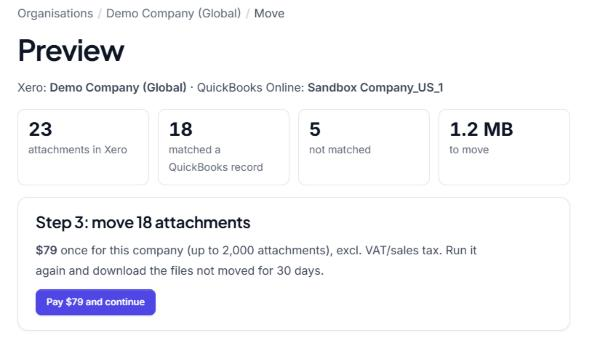
Dataswitcher moves your Xero bills, invoices and bank transactions, but not the files on them. Attachment Mover reads which Xero documents have files, matches each one to its QuickBooks Online record by number, date and total, and shows how many match before you pay anything. Moving them is a one-time $79 per company for up to 2,000 attachments.
More in the guide How to move attachments from Xero to QuickBooks Online.
Questions
What doesn't transfer from Xero to QuickBooks Online?
Intuit's page on converting from Xero lists the data Dataswitcher will not convert: assembly builds, budgets, memorized transactions, deleted transactions, draft or unposted journals, jobs not attached to transactions, closed or partially closed estimates and purchase orders, bank reconciliation history, file attachments, invoice and other templates, the terms list, the employees list, payroll information, project details and fixed assets management. Transactions in other currencies are converted into the home currency.
Source: Intuit (US): Convert from Xero to QuickBooks Online (updated 4 Aug 2026)
Do attachments transfer from Xero to QuickBooks Online?
No. File attachments are on Intuit's list of Xero data that will not be converted, so the receipts and PDFs stay in Xero. Attachment Mover copies them onto the matching QuickBooks Online bills, invoices and expenses after the migration, with a free preview of how many match.
Source: Intuit (US): Convert from Xero to QuickBooks Online (updated 4 Aug 2026) · Intuit (Australia): Transferring Xero data to QuickBooks Online (no date on the page)
Does the QuickBooks Desktop to Online migration move attachments?
Partly, by Intuit's US page: some file types and locations don't move, and you get a report of what transferred so you can upload the rest. Intuit's Canadian page says attachments linked to transactions are not transferred. Attachment Mover works from Xero only, so it does not help here.
Source: Intuit (US): Learn about switching from QuickBooks Desktop to QuickBooks Online (updated 5 Nov 2026) · Intuit (US): Learn how features and data transfer from QuickBooks Desktop to QuickBooks Online (updated 5 Nov 2026) · Intuit (Canada): Learn how features and data transfer from QuickBooks Desktop to QuickBooks Online (no date on the page)
How long do I have to import my QuickBooks Desktop file?
90 days from when you sign up for QuickBooks Online, or 180 days if your accountant does the import. The import replaces any data already in the online company, and it can't be undone.
Source: Intuit (US): Learn about switching from QuickBooks Desktop to QuickBooks Online (updated 5 Nov 2026) · Intuit (US): Move your QuickBooks Desktop company file to QuickBooks Online (updated 5 Nov 2026)
How many years of Xero history are converted?
Up to 2 fiscal years at no charge: opening balances, invoices and credits, bills and credits, bank transactions and matched payments. Additional years, inventory items, tracking categories and company information are extra-fee options.
Source: Intuit (US): Convert from Xero to QuickBooks Online (updated 4 Aug 2026)
Which QuickBooks Online plan do I need after migrating?
It depends on your file. More than 250 accounts needs Advanced. Classes and locations need Plus (40 combined) or Advanced (no limit). Inventory tracking needs Plus or Advanced. Billable users are 1, 3, 5 and 25 from Simple Start to Advanced. Multicurrency is not on Simple Start.
Source: Intuit (US): Learn about usage limits (updated 19 Nov 2026) · Intuit (US): Convert from Xero to QuickBooks Online (updated 4 Aug 2026) · Intuit (US): Learn how features and data transfer from QuickBooks Desktop to QuickBooks Online (updated 5 Nov 2026)
Is this an official Intuit or Xero score?
No. The list of what does not transfer comes from Intuit's own help pages, linked on every item; the points next to each item are our own estimate of how much work it causes, added up and capped at 100. Where Intuit's pages don't answer a question, the item says "not verified" and scores little or nothing.
Source: Intuit (US): Convert from Xero to QuickBooks Online (updated 4 Aug 2026) · Intuit (US): Learn how features and data transfer from QuickBooks Desktop to QuickBooks Online (updated 5 Nov 2026)
Is what I enter sent anywhere?
No. The scorecard runs in your browser: your answers and any file you load are read on this page and never uploaded, and there is nothing to submit. Close the tab and they are gone.
Intuit pages read on 26 November 2026. This scorecard is made by Atesen Software and is not affiliated with Intuit, Xero or Dataswitcher.